


Description
Download 100 Happy Money Screensaver – Calming Underwater Animations, Global Banknotes, Clock Display
Overview
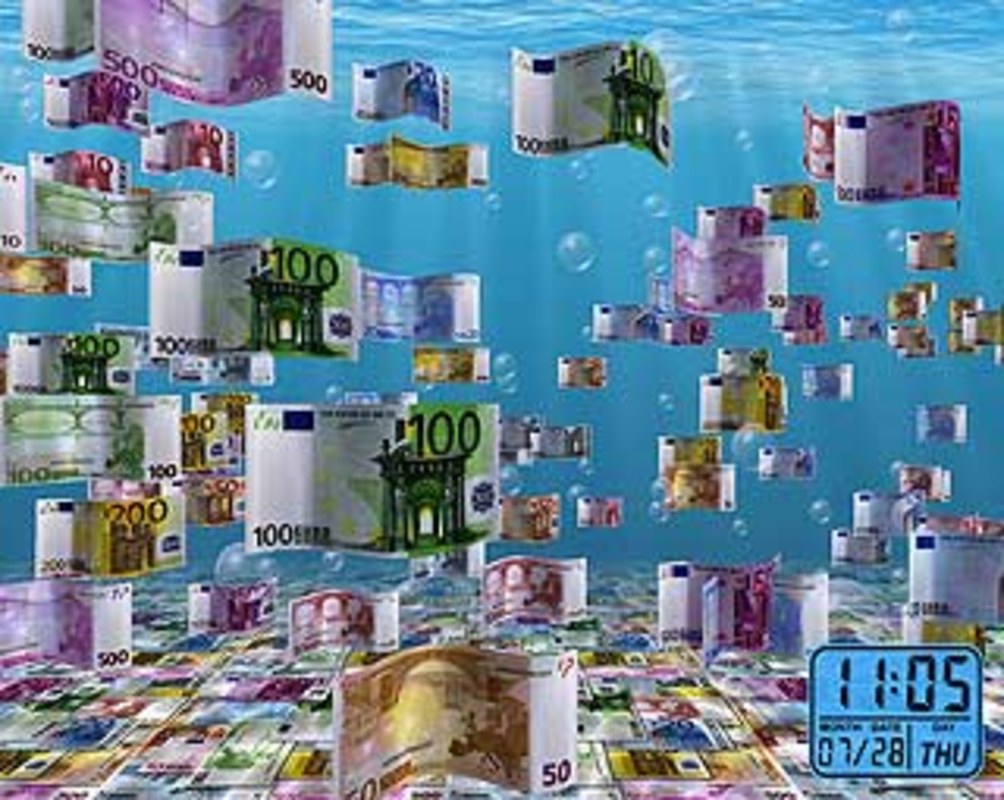
The 100 Happy Money Screensaver is a visually engaging digital experience designed to transform idle screen time into a moment of calm and cultural appreciation. It presents a dynamic display of banknotes from various countries, animated against serene underwater scenes, creating a unique fusion of financial art and ambient relaxation. The app aims to alleviate daily stress by offering a visually soothing environment that users can enjoy during breaks or while their device remains inactive. Its primary function is to serve as a screensaver, but it also includes a practical timekeeping feature, displaying the current date and time without requiring user interaction.
Target users include individuals seeking a mindful digital pause, remote workers, students, and anyone who values aesthetic and functional screen experiences. The app’s blend of global currency visuals and tranquil animations appeals to both casual viewers and those with an interest in world cultures and design. While the developer is not named in the provided information, the app’s release date of March 22, 2009, indicates it has been in circulation for over a decade, suggesting a level of endurance and user retention. Its continued relevance speaks to its ability to meet a niche but consistent demand for calming digital content.
Within the broader digital ecosystem, the app occupies a space between utility and entertainment. It offers more than simple visual decoration—it provides a subtle form of digital wellness by reducing visual fatigue and promoting mindfulness. Real-world use cases include using it during study sessions, work breaks, or as a background during video calls to maintain a peaceful atmosphere. Despite its age, the app remains a relevant tool for users who value both beauty and functionality in their digital tools.
Key Features & Functionality
- Soothing Underwater Effects: The app features gentle animations of aquatic environments, including floating bubbles and swaying sea plants, creating a meditative visual rhythm. These effects are designed to reduce mental strain and promote relaxation, especially useful during long screen sessions.
- Global Banknotes Display: A curated collection of banknotes from multiple countries is showcased in motion. Each note appears with subtle movement, allowing users to appreciate diverse design elements, security features, and artistic styles from different economies.
- Integrated Clock Feature: The current time and date are displayed in a non-intrusive manner, typically in a corner or overlay of the screen. This allows users to stay informed without disrupting the visual flow or requiring interaction.
- Customizable Settings: Users can adjust the number of banknotes, the density of bubbles, and the underwater background theme. This level of personalization ensures the experience aligns with individual preferences for visual density and mood.
- Low Resource Usage: Although not explicitly stated, the app’s long-standing presence suggests efficient resource management, enabling smooth performance even on older systems.
For example, a user working from home might activate the screensaver during a break, using the calming visuals to reset their focus. Another user could set the app to display European banknotes during a study session, subtly enhancing their environment with cultural inspiration. The combination of relaxation and utility makes it suitable for both personal and professional settings.
Interface, UX & Performance
The interface of 100 Happy Money Screensaver is minimal and focused, designed to function seamlessly in the background without overwhelming the user. The visual layout centers on the animated underwater scene, with banknotes floating naturally across the screen. Navigation is not required during normal use, as the app operates automatically after activation. However, access to customization options is typically achieved through a settings panel, which is likely accessible via a right-click menu or a dedicated control interface.
The visual style is soft and pastel-toned, emphasizing tranquility over vibrancy. The animations are smooth and fluid, suggesting optimized rendering for consistent frame rates. Although the developer did not list formal performance metrics, the app’s longevity indicates stable behavior across various hardware configurations. It is likely to perform well on mid-range systems, though specific requirements were not disclosed.
Responsiveness is expected to be high, as the app does not require user input during operation. Stability appears strong, given its release date and continued availability. Users can expect minimal crashes or memory leaks, particularly when used in standard screensaver mode. The overall UX prioritizes simplicity and immersion, making it accessible even to users unfamiliar with advanced digital tools.
Platform Compatibility & Technical Requirements
The 100 Happy Money Screensaver is designed for desktop operating systems, though the specific platform and version were not provided. The file size is also not listed in the input data. Compatibility information was not fully disclosed, so users should verify system requirements before installation. The developer did not specify minimum OS requirements, nor did they provide details about hardware compatibility or supported architectures.
Given the app’s release date in 2009, it may be optimized for older versions of Windows, but this cannot be confirmed without official documentation. Users are advised to ensure their system meets the necessary prerequisites before attempting installation. The lack of detailed technical specifications means that compatibility with modern operating systems should be tested carefully.
Pros and Cons
- Offers a calming visual experience with underwater animations and floating banknotes
- Includes a functional clock display for time tracking
- Provides customizable settings for personalization
- Combines aesthetic appeal with subtle utility
- Has a proven track record with over a decade of availability
- Specific system requirements were not listed
- Platform and file size details are unavailable
- May not be compatible with newer operating systems
- Limited interactivity beyond basic settings
- No official update history provided
FAQ
Is 100 Happy Money Screensaver safe to download?
The app’s long-standing presence suggests it is free from known malware. However, users should download it only from trusted sources to ensure security.
Can I use this screensaver on modern operating systems?
Compatibility with current systems is uncertain due to the lack of official specifications. Testing on a compatible machine is recommended.
Does the app require an internet connection?
Based on its design, the screensaver operates offline and does not require an active internet connection.
Is there a mobile version available?
There is no information indicating a mobile app version. The app is designed for desktop use.
How do I install 100 Happy Money Screensaver?
Users should locate the installer file, run it, and follow the on-screen prompts. The process typically involves selecting a destination folder and confirming installation.
Final Thoughts + CTA
100 Happy Money Screensaver stands out as a thoughtful blend of relaxation, cultural appreciation, and practical functionality. Its serene underwater visuals and global banknote displays offer a unique digital escape, while the integrated clock ensures users remain informed. Though details about system requirements and updates are limited, its enduring presence speaks to its reliability and user appeal. It is ideal for those seeking a peaceful digital atmosphere during work, study, or rest. For users who value both beauty and utility in their digital tools, this screensaver delivers a meaningful experience.
Download 100 Happy Money Screensaver now
Guides & Tutorials for 100 Happy Money Screensaver
How to install 100 Happy Money Screensaver
- Click the Preview / Download button above.
- Once redirected, accept the terms and click Install.
- Wait for the 100 Happy Money Screensaver download to finish on your device.
How to use 100 Happy Money Screensaver
This software is primarily used for its core features described above. Open the app after installation to explore its capabilities.
User Reviews for 100 Happy Money Screensaver 0
No reviews found


